 Mon Prof Augmenté
Our evening routine: 15 minutes of reading aloud
Every evening at 8:45 p.m., my calendar has the same appointment: fifteen minutes of reading with my son. He reads aloud. I sit beside him and note the chapter we read and the words he discovers. I use those notes later for his dictations in Dictée Ludique. During the reading, I also submit unfamiliar words to Sésamot.
I’ve already written about my weekend routine for going over what he learned during the week. In the evenings, I start with what my son comes across in his book. We read in French, which is why the book titles and vocabulary examples below are in French.
An appointment at 8:45 p.m.
I created a recurring calendar event from 8:45 to 9:00 p.m. every evening. For the title, I write “Livre :” (Book:), followed by the name of the book we’re reading. While he reads, I add the chapter and the words we discuss to the notes.
A few days later, I can find those words without leafing through the book to locate the passage. That’s mainly why I keep these notes.
Here’s a template you can use in your own calendar:
Title: Book: [book title]
Time: 8:45 to 9:00 p.m., every evening

Session notes:
Chapter read: [chapter number or title]
Words discussed: [words encountered this evening]
To keep a record, save the notes for that day’s occurrence of the event. Applying tonight’s chapter to the whole recurring series would defeat the purpose of this little reading journal.
Which books fit those fifteen minutes?
I asked ChatGPT for ideas for a nine-year-old who already has a good grasp of vocabulary, spelling and comprehension. The requirement was specific: reading aloud for fifteen minutes each evening.
These are some of the titles I picked out from that conversation about choosing books. I’ve kept the French titles because those are the editions we’re considering:
- Le Feuilleton d’Hermès, by Murielle Szac;
- Verte, by Marie Desplechin;
- Charlie et la chocolaterie and Matilda, by Roald Dahl;
- Le Livre des Étoiles, starting with Qadehar le Sorcier, by Erik L’Homme;
- Le Magicien d’Oz, by L. Frank Baum;
- Les Aventures de Tom Sawyer, by Mark Twain;
- Arsène Lupin, gentleman cambrioleur, by Maurice Leblanc;
- Le Roman de Renart, in a children’s edition;
- Harry Potter à l’école des sorciers, by J. K. Rowling.
This is a list to choose from. What we read will depend on what interests him and how difficult the text is to read aloud. The edition matters too, especially with classics: it’s worth looking at the actual text your child will be reading.
While he reads, I note unfamiliar words
Listening to him read, I can hear when he hesitates. Understanding is harder to spot: he can pronounce a word perfectly well without knowing what it means. When we stop to explain one, I write it down.
The suggestions list in Sésamot gives a sense of the French vocabulary we’ve come across: “prompte”, “auguste”, “tyran”, “ascète”, “porcelet”, “hargne”, “pitance” and “suzerain”.
I wouldn’t necessarily have thought to teach him these words. They came up in the story. I want to be able to find them again after we’ve turned the page.
I suggest the words in Sésamot
While he reads, I open “Proposer un mot” (Suggest a word) in Sésamot, the children’s word-of-the-day app. I enter the word and its language. The “Où l’as-tu rencontré ?” (Where did you come across it?) field also lets me name the book or passage.
Sésamot is the French name; on Google Play in English, the app is listed as WordHoard: Word of the Day.
Find Sésamot on iOS in the App Store (France) or on Android in Google Play.
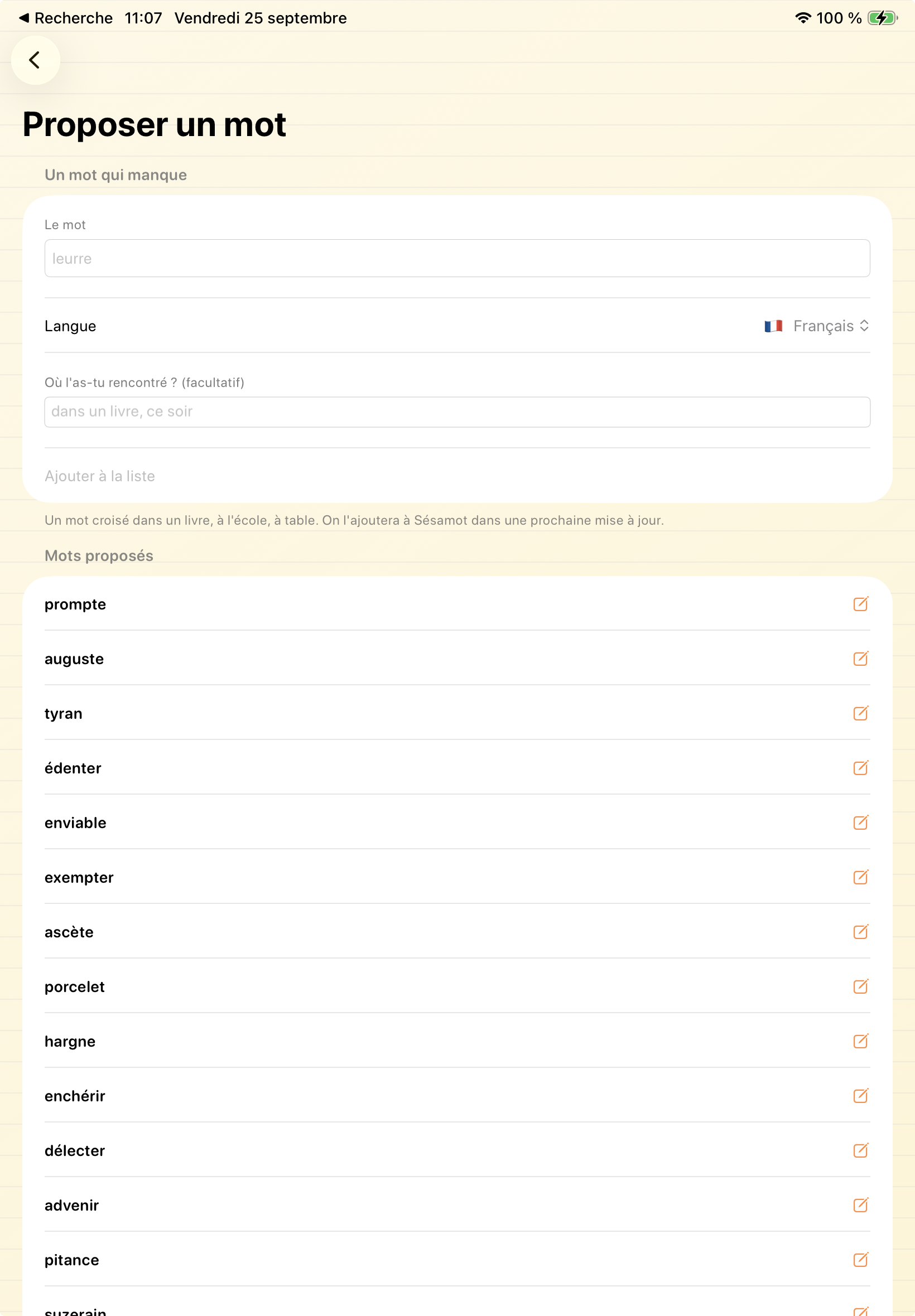
The screenshot shows the French interface. The “Mots proposés” (Suggested words) list below the form keeps the submissions. You can see “exempter” and “enchérir” among the words already added.
These are suggestions for inclusion: the screen says the words will be added to Sésamot in a future update. They don’t immediately become the word of the day. Once included, my son will be able to find them in the app, with definitions and vocabulary games.
I use the book and words for his dictations
The calendar notes then help me prepare personalized dictations in Dictée Ludique. They bring together the book title, the chapter read and the words we’ve discussed.
Find Dictée Ludique on iOS in the App Store (France) or on Android in Google Play.
I use the book as the subject of the dictation and the words I’ve noted as vocabulary to revisit. He gets to write words we’ve already talked about while reading.
Recognizing a word in a sentence and knowing how to spell it are different things. Dictation gives us a chance to return to its spelling after meeting it in the book and discussing its meaning.
Leaving time for the story
I want to keep this to fifteen minutes. Dictation happens at another time; in the evening, we carry on with the book. The calendar notes and suggestions in Sésamot keep track of what we can return to later.
When preparing the next dictation, I can reopen yesterday’s event and find the words we paused over. “Pitance” or “suzerain” would hardly spring to mind if I were staring at a blank page. This way, I know why they’re on the list.